Quality Assurance testers play an important role in verifying that company software maintains its functionality and reliability. Effective software testing relies on several methods working together across the software development lifecycle, and QA teams get better results by combining approaches. Testers who rely on one method alone tend to miss issues they could catch with another test type. Because the world of software testing is an expansive one, QA testers should equip themselves with an understanding of which types of software testing are most relevant to their daily tasks.
With so many different software testing types, it can be overwhelming knowing where to start. This guide is specifically designed for QA professionals and engineering teams looking to boost their knowledge about the testing types most relevant to their work, along with a sense of where each one fits in the development lifecycle.
Read on for a general overview of software testing terminology, with a specialized focus on the nine types of software testing that QA professionals should be familiar with.
Table of Contents
- What’s the difference between manual and automated testing?
- What’s the difference between functional and non-functional testing?
- Choosing the right software testing type
- What are the most common types of software testing for websites and browser applications?
- How Ghost Inspector Supports Modern Software Testing
- Conclusion
Automate your QA test strategy with Ghost Inspector
Our 14-day free trial gives you and your team full access. Create tests in minutes. No credit card required.
What’s the difference between manual and automated testing?
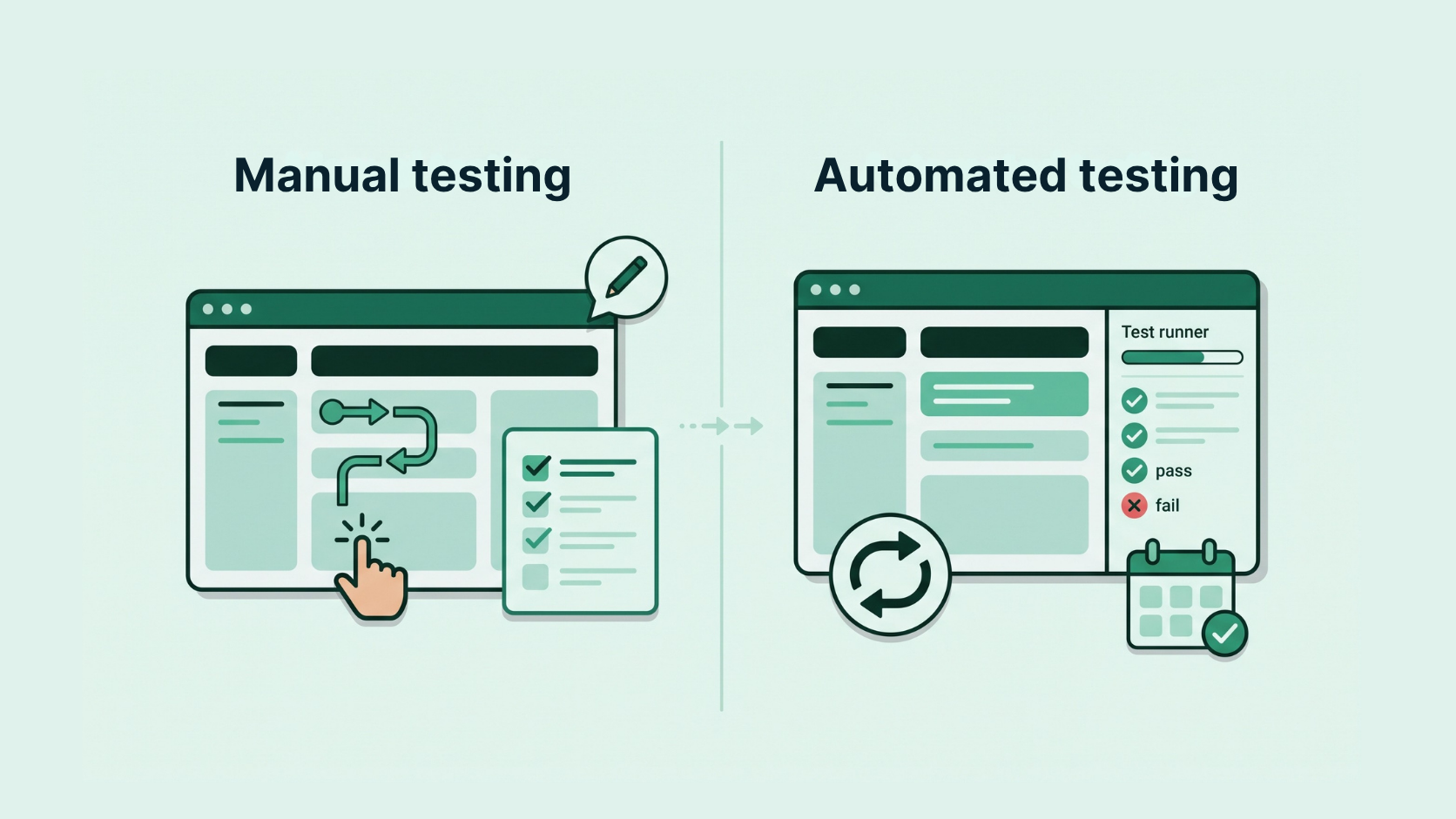
Manual testing and automated testing work best together, each covering ground the other can’t. QA engineers draw on both in their test case strategy, and the two complement each other well throughout the software development lifecycle.
Manual testing is the process of executing test cases by hand and interacting with software without automated tools or scripts. Manual testers simulate user actions, input test data, and check application responses to root out defects in the software they’re testing. This hands-on approach earns its place with exploratory testing, user experience, and troubleshooting test failures with broader coverage. Though it can be time-consuming, manual testing is an important tool to assess usability and validate new features.
Automated testing is a testing technique that uses software automation tools and scripts to run test cases, input data, and compare results. Test teams reach for it on specific testing scenarios that require repetition, where it completes those tasks with greater efficiency. Setting up predefined test scenarios can call for skilled software engineering, but the results free up the testing team to spend their time on more complex test cases.
Automation today takes more than one form. Many teams write their tests in code, using frameworks like Selenium or Playwright. Team members who don’t write code can use no-code testing tools instead, creating and running tests through a visual interface. Both approaches count as automated testing, and plenty of QA teams use each one depending on who builds a given test and what needs coverage.
As well, the two styles act as cover for each other’s weak spots. Manual testing brings human judgment to the places that need it, while automated testing handles scale and repetition, and a strong strategy leans on both.
What’s the difference between functional and non-functional testing?
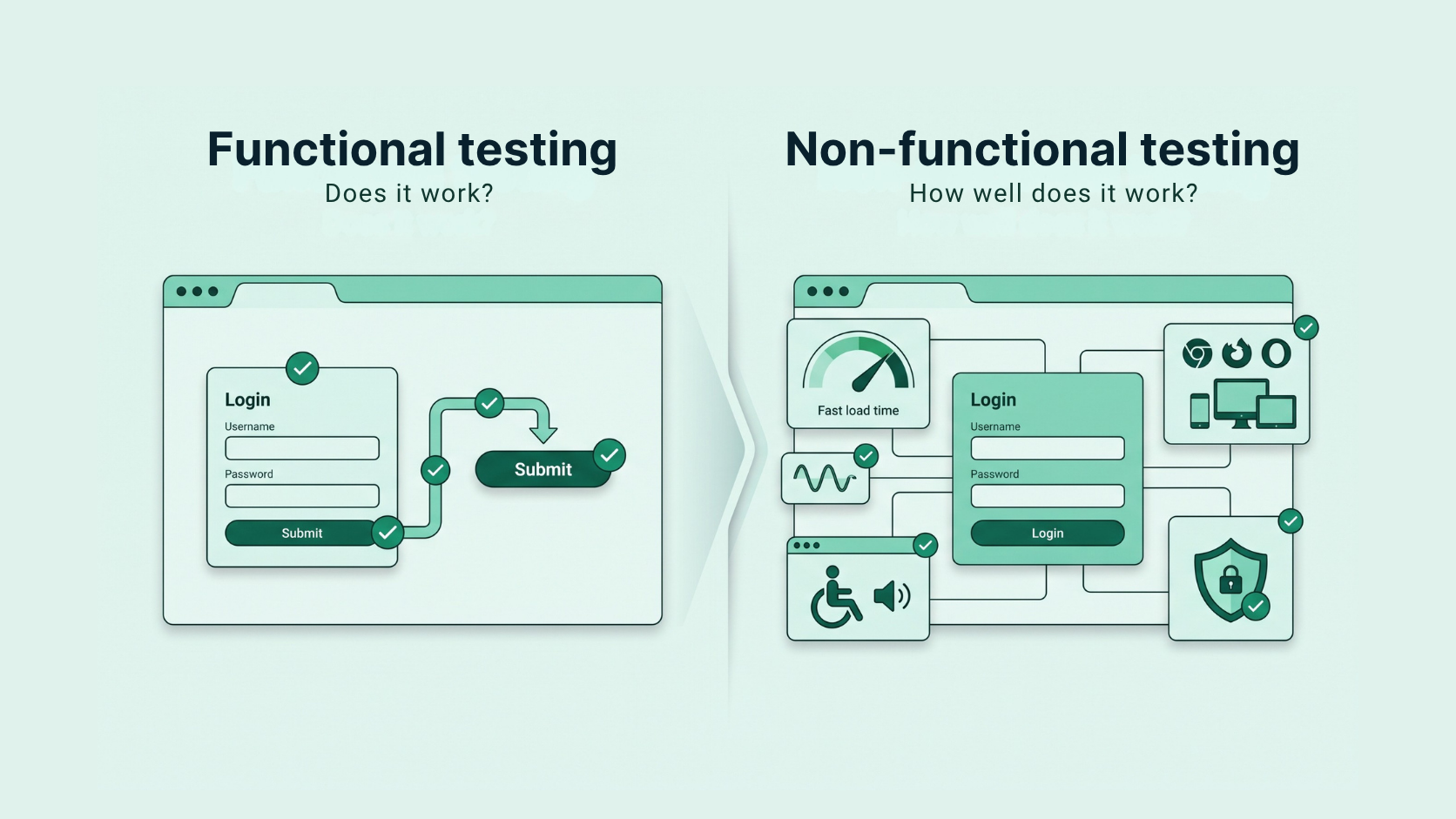
In software testing, all tests can be divided into one of two basic categories: functional testing and non-functional testing. The two categories answer different questions about the software. Functional testing asks whether the software does what it should. Non-functional testing asks how well it does it. QA teams need both, because a feature can work exactly as specified and still frustrate users if it loads slowly, buckles under traffic, or locks people out using a screen reader.
Functional testing assesses the functionality of your software application. It confirms that all parts of the software system are working as they should, checking that the software does what it was made to do against business requirements. Unit testing, integration testing, system testing, and acceptance testing all fall under this category.
Non-functional testing evaluates the qualities behind a good user experience once the software works. It tests how the system behaves under different conditions rather than whether a given feature functions, covering concerns like performance, usability, compatibility, and security. Compatibility testing, usability testing, performance testing, and load testing all belong here.
The functional testing types use a step-by-step sequence approach to testing, beginning with individual components and expanding to the entire system. Each type in this category verifies that the software functions as intended and meets proper quality standards. Non-functional testing types focus on the parts of the software system that progress beyond functionality, centering on different elements of the end-user experience. By combining these two testing types, QA engineers can ensure a comprehensive approach to software testing, confirming that the software performs correctly and that it provides a high-quality user experience.
Choosing the right software testing type
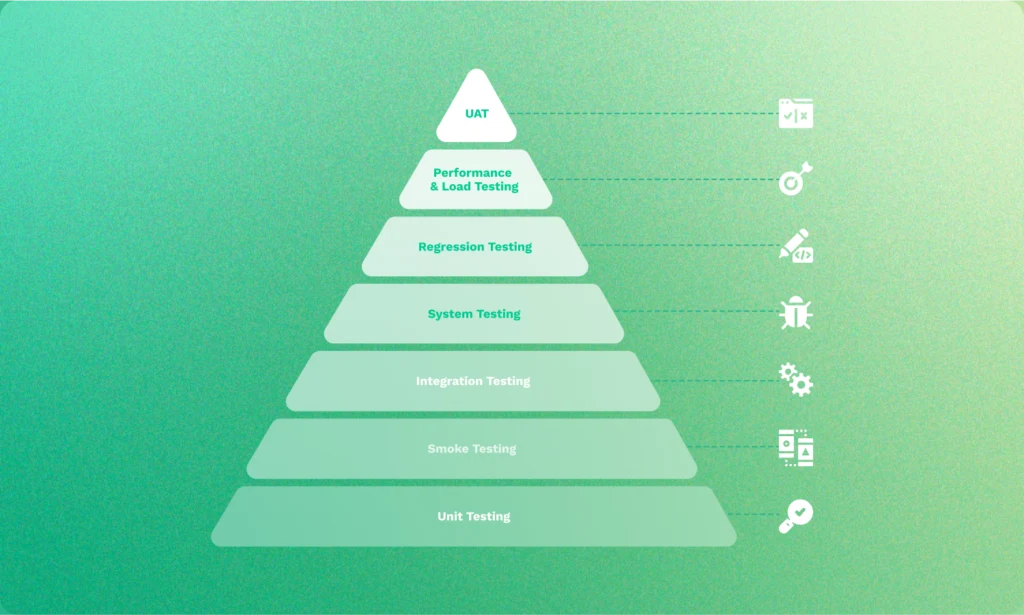
No single testing method catches every problem. Unit testing can spot a broken calculation in a single function, but it won’t say anything about whether the checkout flow works end to end, or whether the page still loads under heavy traffic. Each type of software testing answers a question the others can’t, which is why teams reach for different methods at different points.
For a QA team, the question worth asking is which failures could reach users, and which method catches each one. A slow checkout, a feature that breaks on Safari, a form that a screen reader can’t read—these are different risks, and each has a testing type suited to catching it.
When a testing method runs is just as important as which one you choose. Catching a defect early, during unit or integration testing, costs far less to fix than catching it after release, when it has already reached customers. Modern QA teams account for this by testing throughout the software development lifecycle rather than saving it for the end, combining several methods so coverage builds as the software moves from first commit toward release.
The nine types below each earn their place in that kind of strategy. Knowing what each one does, when it runs, and whether it calls for manual effort, automation, or both will help you decide where it fits in your own testing process.
What are the most common types of software testing for websites and browser applications?
1. Unit testing
Unit testing verifies that software works correctly by testing independent units of code, like methods or functions, to confirm individual functionality. It sits at the lowest level of testing, closest to the source code, which makes it the first place where defects show up during development. Catching them there helps keep small errors from turning into debugging delays later on. Unit testing also improves code quality and speeds up app development.
Unit tests are run early and often, typically every time a developer commits new code. Because they run quickly and cheaply, teams automate them as a matter of course and wire them into a continuous integration pipeline, so the suite can check each change before it reaches the shared codebase. This makes unit testing one of the clearest examples of shifting testing earlier in the development process, where fixes are the least expensive.
Although unit testing is primarily the responsibility of the developer team, QA testers can collaborate with engineers early in the development process to confirm the most comprehensive testing approach. QA teams can uncover gaps in test coverage, recommend additional test cases, and create testing environments, helping to speed up the software build process.
2. Regression testing
Regression testing confirms that software still works correctly after you’ve introduced updates or modifications. It re-runs test cases that have already passed, to make sure that any recent changes haven’t broken the existing functionality or brought back an old defect.
The need for this testing type grows with your codebase. A small project might call for a handful of checks, while a mature application carries thousands of behaviors that any release could affect, more than a team can re-verify by hand on a normal release schedule. QA testers who acquire regression testing skills can use test automation tools and frameworks to automate these cases, easing the workload on the developer team and speeding up the process.
Teams don’t always re-run every test at once. For routine changes, many run a smaller, targeted set of cases, and they reserve the full suite for larger releases.
3. End-to-end testing
End-to-end testing follows a complete user journey from the first click to the final result, through every layer of the application. A single test might load the site, log a user in, add an item to a cart, process payment, and confirm the order appears in the system afterward. Of all the automated tests, it comes the closest to reproducing what a person does with the application.
Testing the whole journey this way helps catch problems that narrower types often miss, like a checkout that fails only when the payment service and the inventory database return conflicting data. Teams usually run these tests on the business’s most important paths, like signup, checkout, or booking. Those tests are run after the individual pieces have each passed on their own.
However, end-to-end tests also take considerable effort to write, and they need frequent maintenance, since a change to the interface or a dependency can break them where a smaller test would hold. Most teams keep a small set of end-to-end tests for the journeys they can least afford to see fail, and rely on faster unit and integration tests for everything underneath.
4. Usability testing
Usability testing focuses on user experience, assessing how user-friendly a website or application may be. It also verifies ease of use, or how well your users navigate, interact with, and accomplish tasks within the software. During testing, users interact with the software, and testers observe their interactions with tools like screen recording, eye-tracking, and manual observation. Users are then asked for feedback on their experience, including any difficulties they ran into during their interaction.
Teams get the most out of usability testing during design and before a major release, while they still have time to act on what they learn. Running it on a new interface early can catch issues that wouldn’t get reported with a functional test, since a feature can work correctly and still leave people lost.
Because usability testing requires human assessment to arrive at its conclusions, this testing type cannot be fully automated. However, testers can automate segments of the usability testing process, like user data collection, tracking (with heat maps or click tracking), and user surveying.
5. Acceptance testing
Acceptance testing verifies whether a software application meets its specifications and is accepted by its users or stakeholders. It validates the software against business requirements, functionality, usability, and overall user satisfaction. Acceptance testing is the last segment of testing before the software is ready for use, confirming that the application serves the purpose it was created for and does so without defect.
By the time acceptance testing begins, functional and system testing have verified that the software behaves as intended, and release is close. Businesses most often conduct it as user acceptance testing, or UAT, in which actual users or stakeholders evaluate the software against real-world scenarios ahead of release. Their approval determines whether a build is ready to ship.
A substantial portion of acceptance testing can run automatically through simulated user flows and test scripts. Certain judgments still require human assessment, since determining whether the experience meets user expectations remains a matter of interpretation. Once QA testers understand the acceptance process, they can participate in requirement discussions, balance test case choices against business needs, and communicate more effectively with stakeholders.
6. Compatibility testing
Compatibility testing verifies accuracy and usability across devices, browsers, networks, and operating systems. For example, the software team must know whether their website or application is compatible with both Windows and Mac, Chrome and Firefox, tablets and smartphones — different devices, browsers, and operating systems. This matters for mobile especially, where iOS and Android come in many versions, screen sizes, and devices, which means that a layout that works on one phone can fail on another.
Teams run compatibility testing before a release that targets multiple platforms, and again whenever they add support for a new browser, operating system, or device. Compatibility testing helps navigate user experience issues that may arise in different environments or system configurations, like image distortions, problems with font and layout, and network connectivity issues.
Those combinations add up quickly, well past what testers can cover by hand. Teams automate this testing type using tools with features like cross-browser testing, virtualization software, and configuration management. Because compatibility problems can wreak havoc on the user experience, QA testers can benefit greatly from educating themselves on this software testing type, so they can optimize test coverage and better prevent those issues before release.
7. Accessibility testing
Accessibility testing certifies that people with disabilities can access, navigate, and use software without issue. It measures the software against established guidelines and standards, like the Web Content Accessibility Guidelines (WCAG), so that people using assistive technology get equal access to those without it.
Accessibility is best tested throughout development, since problems caught during design cost far less to correct than if they’re found after release. For government, education, and enterprise clients, accessibility is often a procurement requirement, which makes early attention to it a practical matter as much as an ethical one.
While accessibility testing can be automated, automation shouldn’t completely replace manual testing, as this type of testing requires a certain amount of human interpretation to confirm that UX accessibility issues don’t fall through the cracks. Someone with a vision disability may rely on a screen reader, software that provides access to tools like a speech synthesizer or braille display. A QA tester can run a manual accessibility test with screen reader software to confirm that a site or application is free of errors and presents itself accurately to those with visual disabilities. When QA testers understand the tenets of accessibility testing, they can make sure their testing scenarios include people with disabilities.
8. Load testing
Load testing evaluates the performance of a software application while running it with different user loads. Software testers check response times, throughput, and stability while simulating different levels of user activity to confirm that the software won’t fail under pressure. Load testing helps with preventing performance bottlenecks, app downtime, and system failure.
Load testing should be run ahead of any event that brings a predictable jump in traffic, like a product launch, promotion, or seasonal peak. Teams also run it on a new system to establish a performance baseline and give them a measure to compare against as the application grows.
Load testing is well suited to automation, since a test automation framework can simulate high user loads while monitoring software performance at the same time. QA testers who understand load testing can pinpoint issues like slow response times, high resource utilization, and scalability problems.
9. UI testing
User Interface (UI) testing, also known as Graphical User Interface (GUI) testing, verifies that the visual elements, layouts, and interactive features of a software work correctly and look right on screen. It examines how the elements of a page are arranged, along with the fonts, colors, graphics, and interactive components a user sees. UI testing also checks responsiveness to user interactions and rendering across multiple browsers and operating systems. A confusing or disorganized interface can undermine any software application, which makes this type of testing an important part of the process.
UI testing should be run once the interface is stable enough to evaluate, and again after any visual change or redesign, since a small edit to the layout can affect elements elsewhere on the page. This work comes late in development, close to release, when the interface reaches its final form.
UI testing can be automated or performed manually, and a good strategy often uses both to maintain overall usability. Automated checks catch rendering problems like broken links, overlapping elements, and inconsistent display across screen sizes and resolutions. Manual review then judges whether the result reads clearly and looks right, the part that needs a human eye. QA testers who develop UI testing skills benefit from learning good UX design methods and from knowing how to spot issues like problems with alignment, broken links, and inaccurate rendering.
How Ghost Inspector Supports Modern Software Testing

Ghost Inspector is a comprehensive automated testing solution that assists QA testers with employing a powerful browser testing strategy. A modern QA team rarely relies on one testing method, and much of what determines a good release happens in-browser, where users interact with the product. Ghost Inspector automates that browser work, running the end-to-end journeys, regression suites, compatibility checks, and UI tests that confirm a release behaves the way users expect. Its browser tests run alongside the team’s unit, load, and manual testing, so browser coverage becomes one clear part of a fuller testing strategy.
Ghost Inspector stands out for its wide range of no-code/low-code features that help software tester teams to collaborate more effectively. Its numerous automation testing tools range from simple to advanced, so that both novice testers and coding experts can tailor their test builds accordingly. For QA testers with limited coding ability, Ghost Inspector offers these intuitive tools:
1. Web Test Recorder
QA testers can easily build reusable tests by clicking through user flows in-browser. These tests can be synced and automated within Ghost Inspector. The test recorder allows users to record typical user interactions and verify that assignments and assertions are functioning correctly.
2. Codeless Test Editor
For QA testers, the ease of ongoing test maintenance is an important factor in a QA testing strategy. Fortunately, Ghost Inspector makes continuous testing nearly effortless with our simple drag-and-drop test editor. As changes occur in your website or software, you can quickly add, remove, or re-order test steps to suit your needs. Plus, Ghost Inspector allows users to store specific test steps to reuse later on.
3. Automated Scheduling
Rather than waste time running one manual test after another, Ghost Inspector allows QA teams to schedule tests in intervals or at specific days and times, so it’s possible to monitor your website or software application around-the-clock with precision. This kind of scheduled monitoring catches regressions and outages between releases, when no one is watching the build by hand.
4. Automated Visual Testing
Ghost Inspector can also help automate the visual regression testing process by using screenshots to detect visual regressions on every single test run. Testers can tailor the process to their needs by adjusting the comparison sensitivity level and hiding dynamic elements that may change upon loading.
5. Automated Accessibility Checks
With Ghost Inspector, QA teams can add accessibility checks to their web pages and applications that follow W3C’s Web Content Accessibility Guidelines (WCAG). With up-to-the-minute reporting that can find accessibility violations immediately, teams can address any issues before users can encounter them.
6. Cost-Effective Parallel Testing
For busy testing teams, Ghost Inspector provides the most efficient and cost-effective solution for automated testing with robust parallel testing capabilities. And with single-purpose test design and sequential testing options, there’s no need to worry about losing track of any potential defects in design.
Ghost Inspector also offers more advanced testing features for QA engineers with coding needs. Testers can incorporate Javascript test steps, inject and use Javascript libraries, and implement smart logic for better ease and control overall. Tests fit into a CI/CD pipeline as well, running automatically on each new build, so browser coverage stays current with the rest of the suite. Whether you’re new to QA testing or you’ve been working in Quality Assurance for decades, Ghost Inspector has the features to create a more seamless testing experience for all.
Conclusion
It takes numerous testing types to create and maintain the quality, reliability, and success of any given software application. No single method covers every risk, which is why the strongest QA teams combine several, matching each testing type to the failures it catches best. A team looks at which parts of the software carry the most risk, and where a defect would hurt users most. They weigh that against the confidence they need before shipping, and choose their mix of methods.
Test automation software like Ghost Inspector supports this layered approach, putting test-building tools in the hands of every member of the QA team, regardless of coding ability. With its no-code/low-code automation capabilities, cross-platform and cross-browser testing support, and user-friendly interface, Ghost Inspector helps QA teams streamline their workflows, verify product compatibility, and achieve remarkable results with ease.
By investing in automated tools like Ghost Inspector, tech businesses can elevate their software quality assurance practices and gain an edge in the fast-paced world of software development.
Build a no-code/low-code automated testing strategy with Ghost Inspector
Our 14-day free trial gives you and your team full access. Create tests in minutes. No credit card required.