






Picture this: your customer completes an online checkout, and their payment goes through successfully, but the order still appears as unpaid. This can happen even when both systems are working correctly on their own, because an error occurs during the communication between them.
Integration testing helps identify these types of issues between connected components, whether that means an application communicating with a database, two services exchanging data, or a system interacting with a third-party API.
We’ll cover what integration testing checks, how it differs from unit and end-to-end testing, and the common failures it can catch, with practical examples of each. Then we’ll look at the four main types and how you can start automating integration checks as part of your testing process.
Table of Contents
- What is integration testing?
- How is integration testing different from unit and end-to-end testing?
- 3 examples of integration testing in action
- What are the four types of integration testing?
- How to plan and automate your first integration tests
- Automate browser checks with Ghost Inspector
- Conclusion
- Integration testing FAQ
What is integration testing?
Integration testing is the part of the software development lifecycle where different parts of the software get combined and tested together. These connected components can include individual modules, services, databases, APIs, and third-party systems. The goal is to make sure that the different pieces function together correctly as a whole.
Integration testing checks how these separate parts interact and helps find problems that only appear when they work together. For example, an integration test might check whether an order application exchanges the correct data with a payment service, updates inventory, and triggers the appropriate notification.
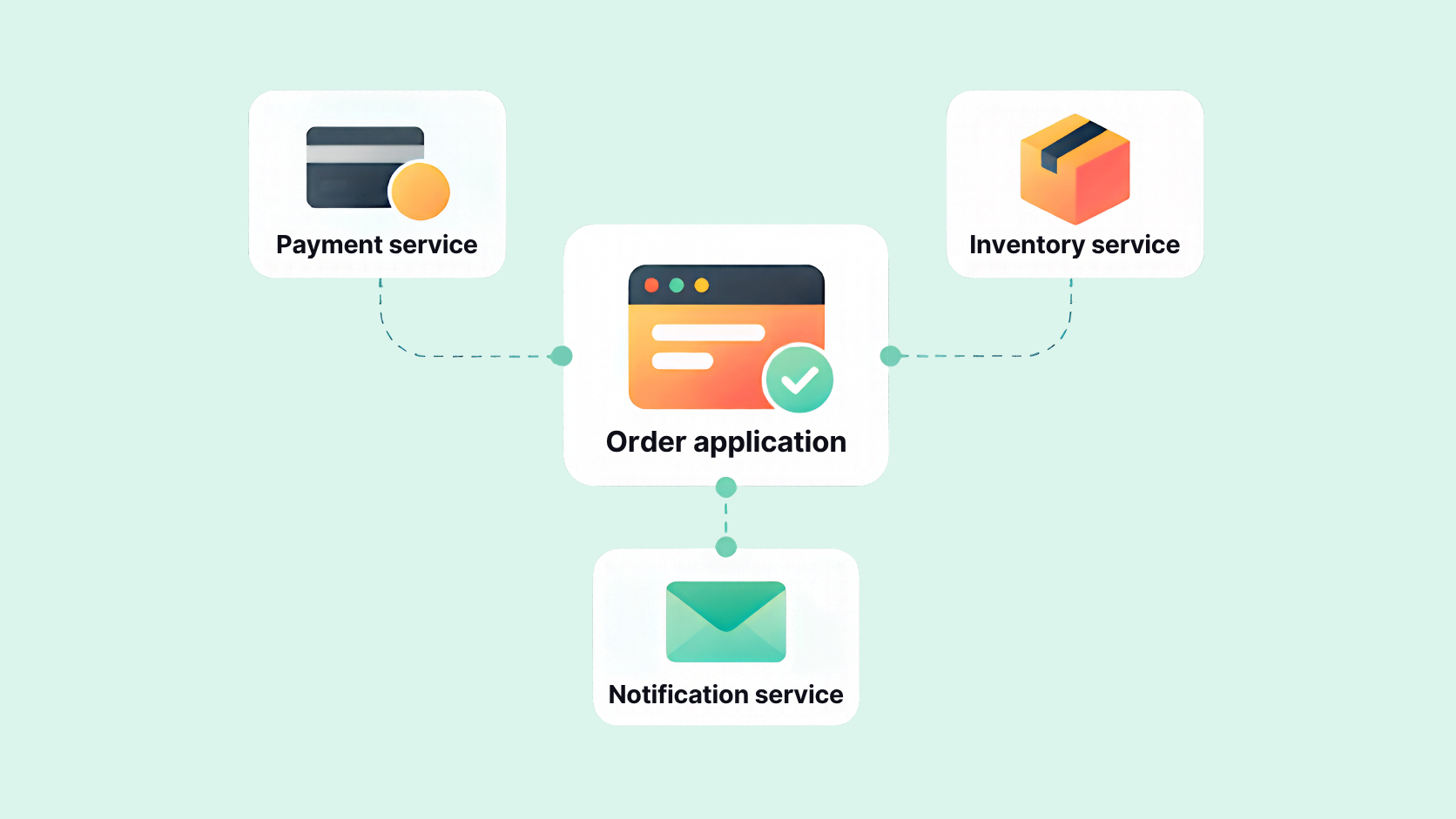
Without integration testing, developers can end up with issues like data not passing correctly between components or features not working as they should when combined. Finding these integration issues earlier makes it easier to determine where a failure is occurring and minimizes the amount of backtracking needed to fix it.
Integration testing is an ongoing part of the software testing process. Teams can run integration tests throughout development and as part of continuous integration to make sure interactions between connected components continue to work as the software changes.
How is integration testing different from unit and end-to-end testing?
Unit, integration, and end-to-end (E2E) testing mainly differ in the scope of what they test. Unit tests focus on individual components in isolation, integration tests check the interactions between components, and E2E tests cover a complete user journey across the application.
Here’s how each type of software testing could apply to the same checkout process:
| Test type | Question | Example |
|---|---|---|
| Unit testing | Does an individual component work correctly in isolation? | Does the order-total calculation work in isolation? |
| Integration testing | Do connected components interact correctly? | Does a payment notification cause the order service to save the correct status in a test database? |
| End-to-end testing | Does the complete user journey work as expected? | Can a shopper complete checkout and see confirmation? |
Contract testing covers another, narrower boundary. It checks whether two components or services follow agreed interface expectations, such as the fields, formats, or responses an API should provide. However, meeting those expectations doesn’t show that two running services can successfully communicate or produce the expected result together, which is where integration testing comes in.
These testing methods complement each other. Unit tests provide targeted coverage of individual components, integration tests cover important connections, and E2E tests build confidence in complete workflows. The same principle applies to browser tests: a focused browser test may check a specific interaction, while a test that follows a shopper through the entire checkout process is an E2E test.
3 examples of integration testing in action
Integration issues can include incorrect data, duplicate processing, missed events, and problems with error handling. Here are three integration testing examples that show what can go wrong when different parts of an application are working together.
1. Order status isn’t updated after a successful payment
Connection: Payment service → order service → test database
A customer makes a successful payment, but their order is still listed as unpaid. Somewhere between receiving the payment information and saving the new order status, something has gone wrong.
An integration test can send a representative payment event to the order handler and check the result in a real test database. Running the same event again can also show whether the application prevents the payment from being processed twice.
Payment providers often send these events using a webhook. A webhook is a way for one application to automatically send information to another when something happens, such as when a payment is completed.
In this case, the order should be marked as paid after the event is processed. If it stays unpaid or gets updated twice, the test gives the team a much clearer idea of where to start looking for the problem.
A simulated payment event is useful for testing what happens after your application receives it. However, it doesn’t tell you whether the payment provider can successfully deliver the webhook in the first place.
2. Checkout allows an out-of-stock item to be purchased
Connection: Checkout → inventory service
Another common issue happens when an item sells out, but a customer is still able to purchase it. The inventory service may have the right stock information, but checkout isn’t handling that information as expected.
An integration test can use an item with no remaining inventory and attempt to place an order. Checkout should stop the purchase and show the appropriate error instead of confirming the order.
If the purchase still goes through, the team knows there’s a problem somewhere in the checkout and inventory connection.
This test can use a real test inventory service or a simulated out-of-stock response. A simulation can show how checkout handles that response, but it won’t test the actual connection to the inventory service.
3. The order confirmation never gets sent
Connection: Order service → notification processing → notification service
Sometimes an order goes through as expected, but the customer never receives a confirmation. This can be especially tricky when notifications are processed separately from the order itself.
For example, an application might place new notification requests in a queue until they’re ready to be processed. A worker then picks up each request and handles the task, like sending the confirmation email.
An integration test can simulate a temporary failure while the notification is being processed. If the application is set up to retry temporary failures, the notification should still be sent once the issue clears without sending the customer multiple copies.
If the confirmation never arrives, the team can look more closely at how the notification is being processed. A test inbox can confirm that the message reached that inbox, but it can’t guarantee that every customer will receive it.
The important part of each integration test is what happens at the end of the interaction. A successful response doesn’t always mean the rest of the process worked as expected, which is why integration tests need to check the resulting outcome.
Add automated browser checks to your integration testing
Our 14-day free trial gives you and your team full access. Create tests in minutes. No credit card required.
What are the four types of integration testing?
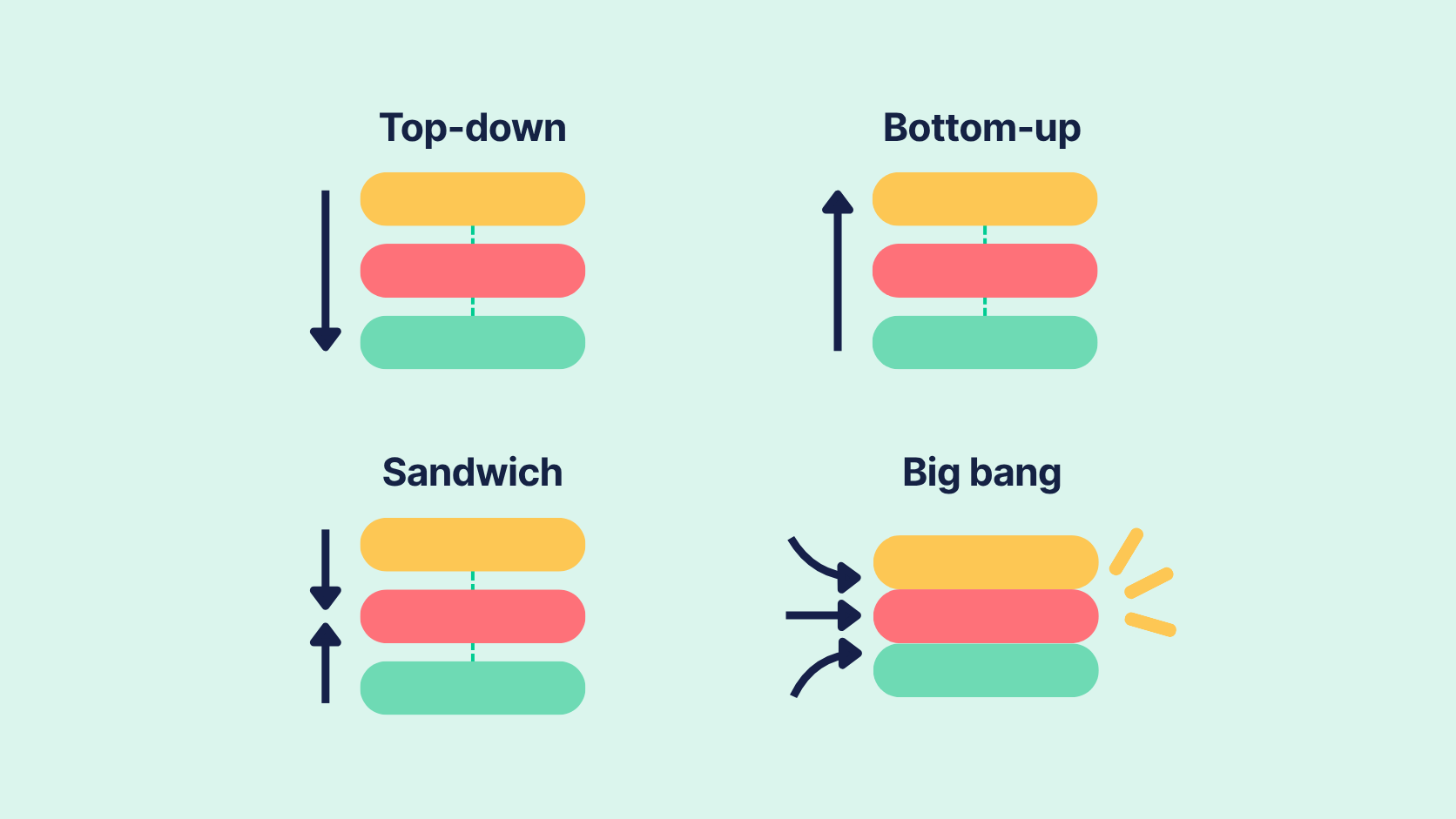
There are four main types of integration testing: top-down, bottom-up, sandwich or mixed, and big bang. The difference comes down to where you start and the order in which you bring the different parts of the application together.
1. Top-down integration testing
Top-down integration testing starts with the higher-level parts of an application and works down to the components they’re dependent on. If a lower-level component isn’t ready yet, a stub can stand in for it and provide the responses needed to continue testing.
This lets teams start testing important application flows early, even when some of the underlying components aren’t completed yet.
2. Bottom-up integration testing
Bottom-up integration testing takes the opposite approach. Testing starts with lower-level components and moves up as more of the application becomes available.
If the higher-level component that normally makes a request isn’t ready, a driver can make that request during testing. This gives teams a way to test lower-level services early, although they’ll need to wait until later to see how everything works through the higher levels of the application.
3. Sandwich or mixed integration testing
Sandwich integration testing uses a combination of top-down and bottom-up testing. Teams can work from both directions at the same time and connect the two as more of the application becomes available.
This can help when different parts of an application are being worked on simultaneously. However, keeping track of the dependencies involved can make testing more complicated.
4. Big bang integration testing
Big bang integration testing brings most or all of the components together before testing how they work with one another. Since those components are already available, there’s usually less need to rely on stubs or drivers.
Troubleshooting is where this approach can get difficult. If a test involves many components and something goes wrong, it may take more time to figure out exactly where the problem started.
Integration testing types vs. test boundaries
The four types above describe the order in which different parts of an application get brought together for testing. The test boundary is the actual connection you’re interested in testing.
For example, you might test how an application works with a database or use API integration testing to check communication between two services. You could also test what happens when one component produces an event for another to process, or when a browser interacts with the application.
This distinction matters because choosing an integration testing type doesn’t determine which connections you test. The same approach can be used across different test boundaries, depending on how your application is built and which interactions you need to cover.
How to plan and automate your first integration tests
You don’t need to test every integration at once. Start with an important connection, decide what a successful interaction should look like, and build your test around that outcome. As you add more integration test coverage, you can automate these checks as part of your regular development process.
1. Choose a critical connection
Start with an interaction that has a meaningful impact on the user, such as checkout or login. Consider what could happen if the connection fails and use that to decide where your first integration test will be most valuable.
Keep the test boundary focused. Testing one connection at a time usually makes it easier to trace any failure back to its source.
2. Define the expected outcomes
A useful integration test needs a clear expected result. It should also cover what happens when the interaction fails.
For a checkout flow, one test case might check that a completed payment results in the appropriate order status. Another could cover a declined payment and make sure the application handles the error as expected.
Defining the outcome ahead of time keeps the test focused on what actually happens after the components communicate, which is especially important for catching problems with data or error handling.
3. Choose the dependencies you need
Using a real test system gives you coverage of the actual connection between components. If you’re working with an external service, you may also have access to a sandbox where you can safely test the integration without affecting production.
Simulations can help when a dependency isn’t available or when you need to reproduce a specific response consistently. Just keep the coverage limit in mind: a simulation tests how your application handles the response you give it, but it doesn’t test communication with the real dependency.
4. Prepare reliable test data
Reliable integration testing starts with reliable test data. Each test should have its own setup so it begins from a known state, along with cleanup for any records it creates. This helps prevent one test run from affecting another.
You’ll also need to account for interactions that take time to complete. Fixed delays can make automated tests slower and less reliable, so wait for the expected condition and set a timeout for cases where that condition never occurs.
5. Automate integration tests in CI/CD
Once your integration tests are reliable, you can add them to your CI/CD pipeline. CI/CD (continuous integration and continuous delivery) helps automate the process of building, testing, and preparing software for release.
Automated integration testing can take place at different points in the test pipeline, depending on what needs to be available first. For example:
Build → unit and integration checks → test deployment → browser checks → release decision
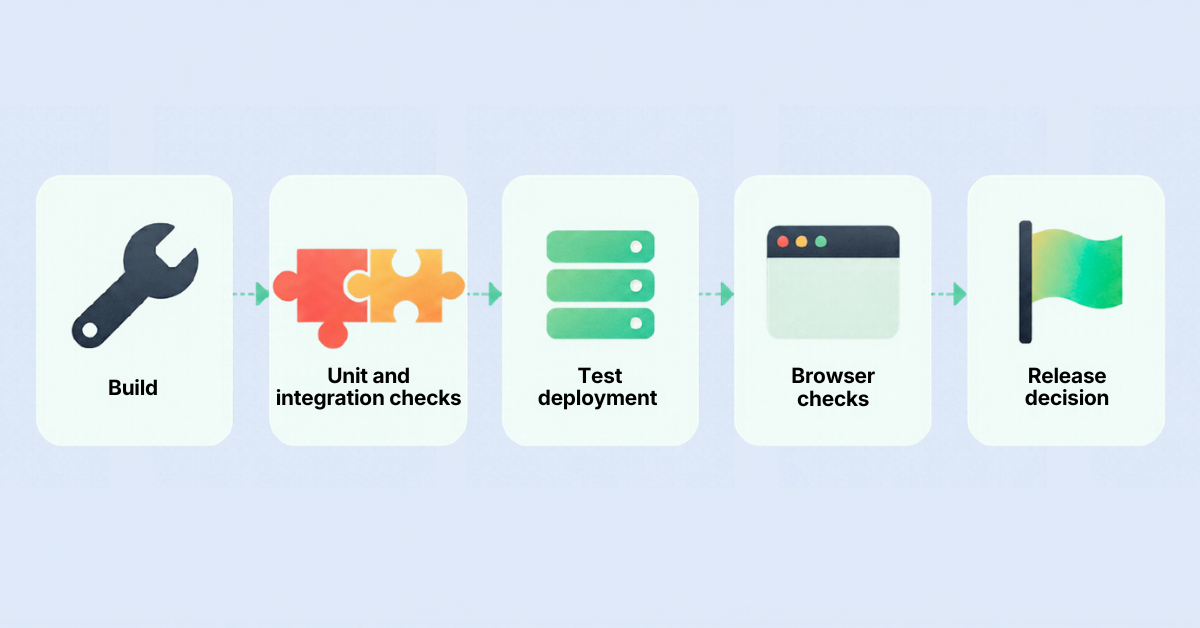
This is one example of a CI/CD workflow, not a required sequence. Your own test pipeline may look different depending on your application.
When an automated test fails, keep enough evidence from the test run to help diagnose the problem. Choose testing tools that fit what you need to test and that your team can maintain over time.
A backend integration test can check that the correct order status was saved in a test database. You can also add browser checks to make sure the customer sees that status after checkout.
Automate browser checks with Ghost Inspector
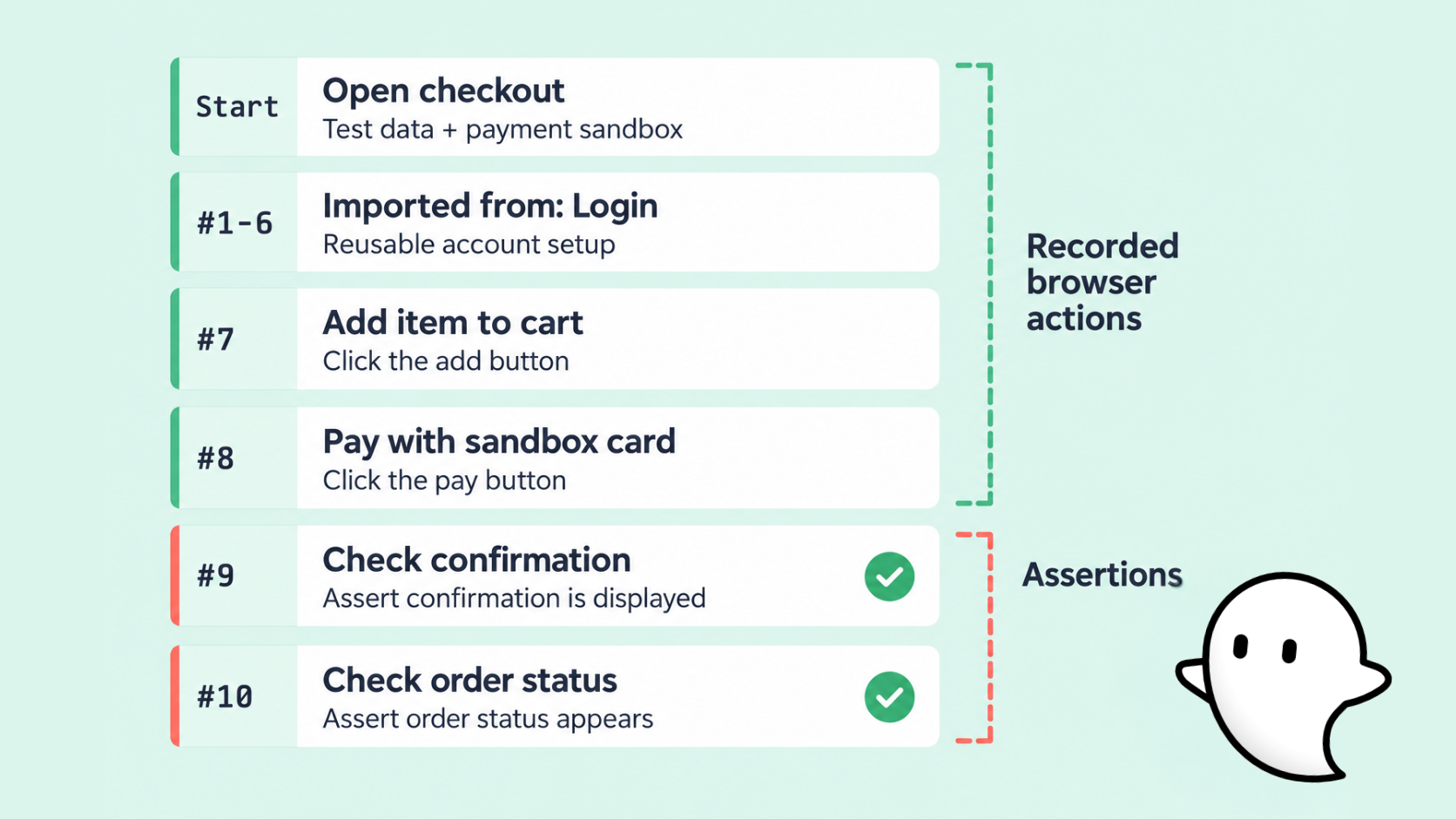
With Ghost Inspector, you can automate browser checks using codeless web tests that are easy to edit and reuse. Continuing with our checkout example, you can create an E2E test that follows the customer through checkout and checks what they see after the payment is processed.
1. Record the checkout flow
Start by using the Ghost Inspector browser extension to record a checkout with controlled test data and your payment provider’s sandbox environment. As you go through the checkout, your browser actions are recorded as test steps that you can edit afterward.
You don’t have to rebuild common setup every time you create a new test. If multiple tests require the same login or account setup, for example, you can save those steps and reuse them. Keeping common steps in one place also makes the tests easier to maintain when the application changes.
2. Add assertions for the result
Next, edit the recorded steps and add assertions for what should appear after a successful checkout. You might check that the confirmation is displayed and that the expected order status appears in the browser.
This gives you a useful second check on the integration. A backend test can confirm that the order status was saved in the test database, while the browser test makes sure that status reaches the customer as expected.
3. Cover the failure case
The successful checkout shouldn’t be your only test. You can create another test using a payment method that produces a decline in the sandbox environment.
This time, the expected result is different. The customer should see the appropriate payment error and shouldn’t reach the successful confirmation.
The two tests can reuse the same setup where it makes sense, which avoids maintaining separate copies of identical steps.
4. Make the checks part of your testing process
Once the tests are reliable, you can schedule them to run automatically or trigger them through your CI/CD pipeline after deployment. This lets the browser checks become part of the test automation process you already use when changes are released to a test environment.
When something fails, Ghost Inspector records the results of the test run along with screenshots and video, giving you more information about what happened in the browser.
Ghost Inspector also offers features that can make automated tests easier to manage as your test coverage grows. You can reuse tests and steps to simplify maintenance, store tests in version control, and run tests in parallel to reduce overall execution time.
For more complex tests, you can execute custom JavaScript within the browser. Ghost Inspector also supports visual comparisons when you want to check the appearance of a page along with its behavior.
Together, these browser checks give you another view of the interactions you’re already testing deeper in the application. Your backend tests can check what happened between the connected systems, while Ghost Inspector can show whether the expected result made it all the way to the user.
Conclusion
Reliable software depends on more than individual components working on their own. Integration testing helps make sure the connections between those components hold up as your application changes.
A good place to start is with one critical connection in your application. Check what should happen when the interaction succeeds; then cover a failure case so you know how the application responds when something goes wrong.
If you want to automate browser checks as part of your testing process, start a free 14-day trial or book a demo to see how Ghost Inspector can fit into your testing workflow.
Integration testing FAQ
What is integration testing?
Integration testing checks how connected parts of an application work together, such as modules, services, databases, APIs, and third-party systems. It finds problems that only appear when those parts interact, like data not passing correctly between components.
What’s the difference between unit, integration, and end-to-end testing?
The difference is scope. Unit tests check individual components in isolation, integration tests check the interactions between components, and end-to-end (E2E) tests cover a complete user journey across the application.
What are the four types of integration testing?
The four main types are top-down, bottom-up, sandwich (or mixed), and big bang. They differ in where you start and the order in which you bring the different parts of the application together.
What’s the difference between a stub and a driver?
Both stand in for parts of the application that aren’t ready yet. In top-down testing, a stub replaces a lower-level component and provides the responses needed to keep testing. In bottom-up testing, a driver makes the request that a missing higher-level component would normally make.
Is contract testing the same as integration testing?
No. Contract testing checks whether two components or services follow agreed interface expectations, such as the fields, formats, or responses an API should provide. It doesn’t show that two running services can communicate successfully or produce the expected result together, which is what integration testing checks.
Can you run integration tests in a CI/CD pipeline?
Yes. Once your integration tests are reliable, you can add them to your CI/CD pipeline. For example, unit and integration checks can run after the build, with browser checks after a test deployment, though your own pipeline may look different.