






Your developers are shipping more code than ever, and a growing share of it is written by AI. Your QA team, meanwhile, is probably the same size it was a year ago.
You’re not imagining the squeeze. In a recent survey of 300 QA practitioners, 52% said bug volume went up after their developers started using AI, and 58% said their own testing workload grew. Not one of them reported getting extra QA headcount to match.
You can’t test everything, so the real job becomes deciding what to test first. This AI-generated code testing checklist gives you a simple way to make that call: score each part of your product on how much damage a failure would do and how likely it is that AI got it wrong, then work down the list.
What’s in this post
- Why AI-generated code needs its own testing plan
- Which flows should you test first?
- The five AI-failure flags: a 60-second audit
- Your AI-generated code testing checklist
- What end-to-end testing won’t catch
- Your first week
- Frequently asked questions
Why AI-generated code needs its own testing plan
Google’s DORA State of DevOps research found that teams using AI ship changes faster, but they also see more of those changes fail and more work get redone. DORA’s take is that AI amplifies whatever a team already has.
If you’ve got solid automated testing in place, the extra speed turns into real output. If you don’t, you mostly end up with more incidents.
The good news is that AI doesn’t break things at random. Its bugs tend to show up in the same few places, so you can aim your testing at those spots instead of trying to cover everything equally.
What kinds of bugs does AI-generated code produce?
Mostly functional bugs, which is when the code runs without any errors but does the wrong thing. A systematic review of 72 studies on bugs in AI-generated code found functional bugs discussed in 78% of them, far ahead of syntax, reliability or security issues.
QA teams see the same pattern day to day. In the DeviQA survey, the most common problems were logical errors (58%) and unhandled edge cases (52%), meaning the unusual situations nobody thought to plan for.
These bugs are easy to miss. Automated code checks look at how code is written rather than whether it does what the business needs, and when AI writes the unit tests too, those tests often share the same mistaken assumption.
What catches them is an end-to-end test, the kind of automated test that clicks through your app the way a customer would. That’s why it matters which ones you build first.
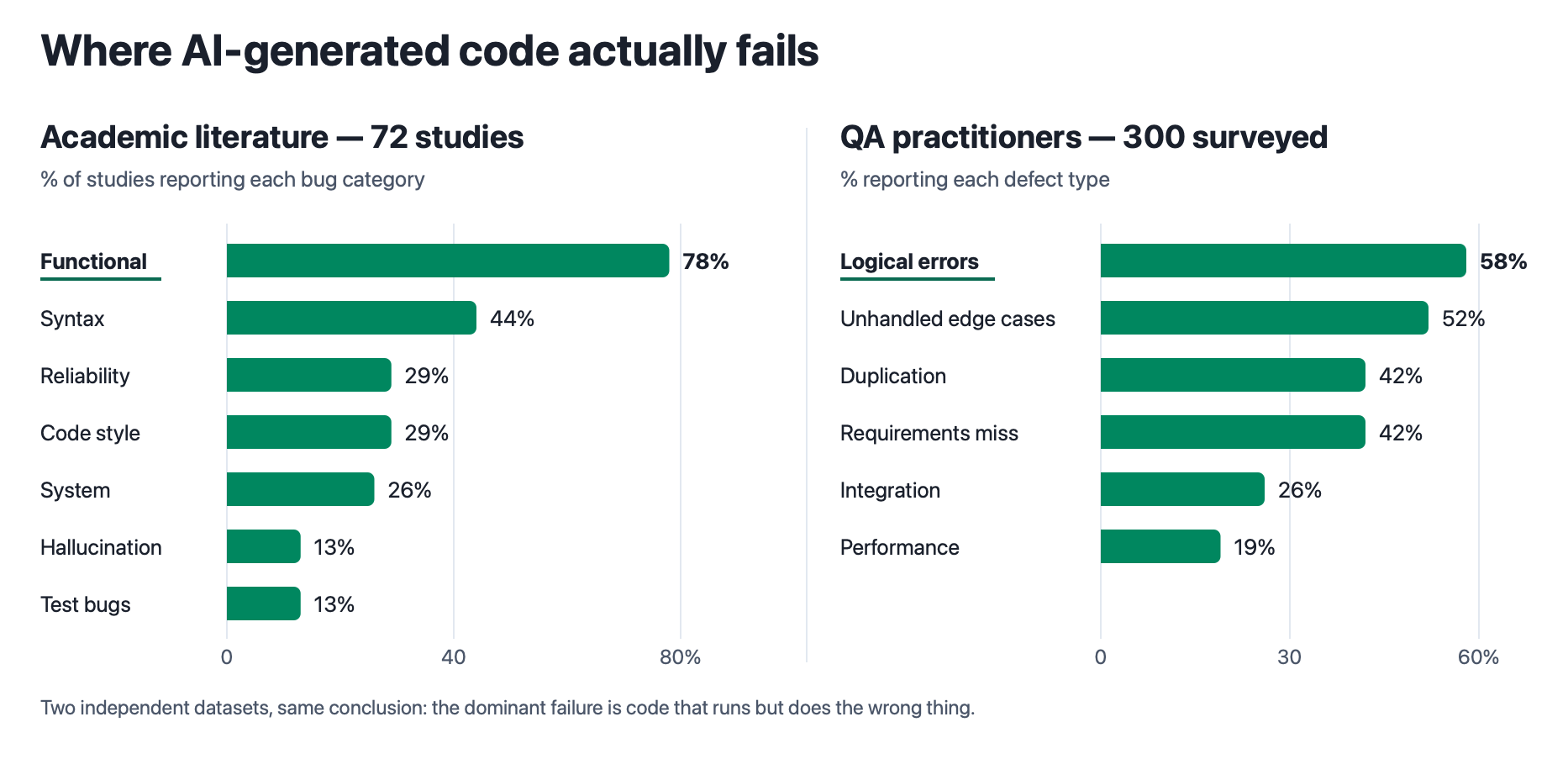
Research and QA teams agree: most AI bugs are behavior bugs. Sources: Gao et al., A Survey of Bugs in AI-Generated Code; DeviQA survey of 300 QA practitioners.
If you want the bigger picture on why AI changes how teams test, our post on how AI-generated code is changing software testing covers it. This one is about the practical side of what to test first.
Which flows should you test first?
Start with the ones that have the highest risk score. A “flow” here is any path a customer takes through your product, like signing up, checking out or exporting their data.
Each flow gets two scores. Multiply them together, and the result tells you where that flow sits in the queue.
The scoring framework
Risk Score = Exposure × AI-Failure Likelihood
How much damage it would do if this flow broke.
How many of the five AI-failure flags apply. One point per flag.
| Score | Tier | What it gets |
|---|---|---|
| 15–25 | Tier 1 | Full end-to-end tests, run before every change goes live |
| 8–14 | Tier 2 | The main route plus its likeliest failures, run after changes go in |
| 4–7 | Tier 3 | Quick smoke tests on a schedule |
| 0–3 | Tier 4 | No automated tests this quarter |
Multiplying, rather than adding, means a low score on either side pulls the total down. That way, a critical flow nobody has touched in a year doesn’t outrank an equally critical flow that AI rewrote last week.
Scoring exposure
Exposure is about consequences: if this flow broke right now, how much would it hurt? Go by impact rather than traffic, because a rarely used admin page that can quietly corrupt customer data still deserves a 5.
| Score | If this flow breaks… | Typical flows |
|---|---|---|
| 5 | Money or customer data is at risk | Checkout, payments, login, permissions |
| 4 | The product can’t do its main job | Signup, onboarding, the primary workflow |
| 3 | Something important fails, but you can recover | Data export, notifications, integrations |
| 2 | Users are annoyed | Account settings, profile, preferences |
| 1 | It’s cosmetic or rarely used | Marketing pages, footer links |
Scoring likelihood
Most risk-based testing frameworks estimate likelihood from how often the code changes and how buggy it’s been in the past. That works for code people wrote, but it misses the specific spots where AI tends to go wrong.
Counting AI-failure flags instead, which you’ll find in the next section, gives you a likelihood score that reflects how the code was actually made.
The five AI-failure flags: a 60-second audit
Go through these five questions for each flow. Every “yes” is worth one point, and once you know where to look, most flows take less than a minute.
| # | Flag | Score a point if… | Where to check |
|---|---|---|---|
| 1 | AI wrote it recently | AI wrote or heavily rewrote the flow in the last 30 days | Your code history, or labels on the change |
| 2 | It talks to another system | The flow connects to an API, another service, a database or a third-party tool like Stripe | The places the change connects to other tools |
| 3 | Nobody wrote the rules down | The business rules behind it were never written down anywhere | The original ticket or spec |
| 4 | It’s full of edge cases | It deals with money, dates and time zones, permissions, or empty and maxed-out states | What the flow accepts and the decisions it makes |
| 5 | The review was rushed | The change was approved quickly, or by someone who didn’t know the requirements | The change’s review history |
Each flag points to a pattern that shows up again and again in AI-generated code. New code hasn’t been used by real customers yet, and AI tends to copy logic from one place to another: GitClear found duplicated code blocks rose eightfold in a single year, so fixing a bug in one spot can leave the same bug alive somewhere else.
Connections to other systems are the flag people miss most often. The model can’t see how that other system actually behaves, so it makes educated guesses about things like field names and error messages, and those guesses usually look right when someone reviews the code.
Missing rules and edge cases line up with what QA teams report, since 42% of practitioners saw code that didn’t meet its requirements and 52% saw unhandled edge cases. A rushed review makes all of it worse, because AI produces more changes for the same number of reviewers to check.
Your AI-generated code testing checklist
Once every flow has both scores, the list sorts itself. Here’s how that works out for a typical SaaS product.
| Flow | Exposure | Flags | Risk score | Tier |
|---|---|---|---|---|
| Checkout & payment | 5 | 4 | 20 | Tier 1 |
| Signup & onboarding | 4 | 4 | 16 | Tier 1 |
| Login / SSO / permissions | 5 | 3 | 15 | Tier 1 |
| Plan upgrade & billing changes | 4 | 3 | 12 | Tier 2 |
| Data export | 3 | 3 | 9 | Tier 2 |
| Account settings | 2 | 3 | 6 | Tier 3 |
| Marketing site contact form | 2 | 1 | 2 | Tier 4 |
Put those flows on a grid and it’s easy to see where to focus, and how much of your product can safely wait.
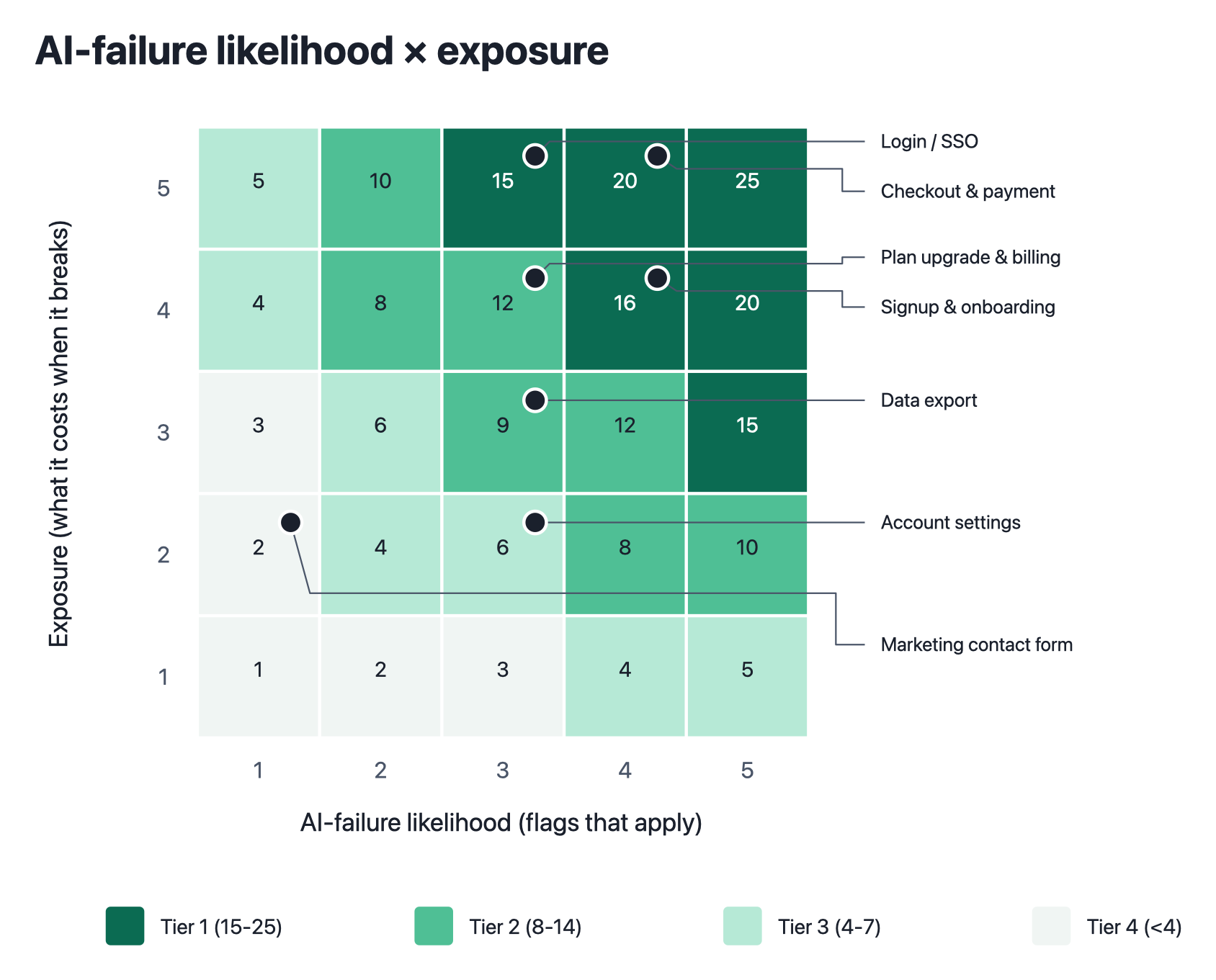
The seven example flows on the grid. Dark cells get full end-to-end tests, and the pale corner can wait.
From there, each tier tells you how thorough the tests should be and when they should run.
| Tier | What to test | When it runs |
|---|---|---|
| Tier 1 | The full journey, what happens when things go wrong, and edge cases | Before every change goes live, plus scheduled runs against the live site |
| Tier 2 | The main route plus the two most likely ways it breaks | After a change is merged |
| Tier 3 | Smoke tests, a quick check that the page loads and basically works | Nightly or weekly |
| Tier 4 | Nothing automated this quarter | – |
If you’re using Ghost Inspector, you can connect your Tier 1 tests to your deployment process so they run on every release, and put your Tier 3 smoke tests on a schedule.
Within a Tier 1 flow, we’d build tests in this order: the full journey first, then what happens when something goes wrong or a screen is empty, then the edge cases AI had to guess at, and finally any existing flows that touch the changed code.
Tier 4 is in there on purpose. Most testing advice only ever adds to your list, and on a small team, knowing what you can skip is what frees up time for the flows that matter.
The same goes for coverage targets. You’ll see advice to aim for 85–90% test coverage on AI-generated code, which is fine if your QA team grew along with your codebase. If it didn’t, testing your Tier 1 flows properly will do more for you than testing everything lightly.
Who should write the tests?
A person, ideally, and not the same AI that wrote the feature. When AI writes both, the tests tend to check what the code currently does rather than what it’s supposed to do, so they can pass even when something’s wrong.
For Tier 1 flows, we’d have a person write the tests based on what the customer actually needs. That’s often someone in support or product who knows the flow inside out.
With Ghost Inspector, they can record a test by clicking through the flow in their browser, without writing any code. Our guide to getting your whole team writing tests covers how to set that up.
What end-to-end testing won’t catch
Security flaws, mostly. Veracode tested more than 100 AI models for its GenAI Code Security Report and found that 45% of AI-generated code samples introduced an OWASP Top 10 vulnerability, meaning one of the ten most common security weaknesses the industry tracks. Newer and bigger models didn’t do any better.
End-to-end tests aren’t the right tool for that job. Problems like passwords left in the code, injection flaws and made-up software dependencies get caught by automated security scanners that read your code directly, and most teams run those on every change in a matter of seconds.
Where end-to-end tests shine is behavior: broken customer journeys, and flows that worked last week but quietly stopped after a change. That’s where most AI bugs turn up, so it’s where this checklist focuses your effort.
It’s also worth keeping the risk in perspective. A large-scale study of more than 500,000 code samples found AI-generated code had more high-risk security flaws, while the human-written code was harder to maintain. The two fail in different ways, and that’s the real reason your testing should change.
Your first week
- List your flows. Write down the paths customers actually take, not your feature list. Most products have somewhere between 15 and 30.
- Score exposure. Do this with someone from support or sales, since they know exactly which breakages generate angry emails.
- Run the flag audit. Your code history answers flags 1 and 5, and the engineer who owns the flow can answer the other three.
- Multiply and sort. You now have a ranked list, with the reasoning behind every position, ready for your next planning meeting.
- Automate your top three. Three tests running on every release are worth far more than twenty sitting in a backlog.
Re-score every quarter or after a big release. The flags change as code ages, which is why likelihood gets its own score in the first place.
Frequently asked questions
Which tests should you write first for AI-generated code?
Score each user flow on exposure (1–5, how much damage a failure would do) and AI-failure likelihood (0–5, one point for each of five warning signs that applies). Multiply them and build end-to-end tests from the highest score down. For most products, that means checkout, signup and login first.
What kinds of bugs does AI-generated code produce?
Mostly functional bugs, where the code runs but does the wrong thing. A systematic review of 72 studies found them discussed in 78%, and QA teams rank logical errors (58%) and unhandled edge cases (52%) highest.
Does AI-generated code need higher test coverage?
Not across the board. Blanket 85–90% coverage targets assume your QA team grew along with your code. If it didn’t, test your highest-risk flows thoroughly and use quick smoke tests for the rest.
Is AI-generated code less secure?
Often, yes. Veracode found that 45% of AI-generated code samples introduced an OWASP Top 10 vulnerability, and newer models did no better. Automated security scanners are the right tool for catching these, not end-to-end tests.
Can AI write its own tests?
It can, but those tests tend to check what the code does rather than what it should do, so they can pass even when it’s wrong. For your riskiest flows, have a person write tests based on the requirements.
Should QA be responsible for AI security vulnerabilities?
Not as the main line of defense. Security scanners should run automatically on every change. QA is best at catching behavior problems, like broken customer journeys and flows that stop working after an update.
Turn your top three into running tests
You’ve got your ranked shortlist. With Ghost Inspector, you record those critical user flows in your browser and run them on every release without writing test code, so your Tier 1 flows are checked before AI-generated changes reach your customers.