






Smoke Testing vs Sanity Testing: Quick Comparison
| Aspect | Smoke Testing | Sanity Testing |
| Purpose | Verifies that the build is stable enough for further testing | Verifies that a specific change or fix works as expected |
| When It Happens | After a new build or deployment | After a minor update or bug fix |
| Scope | Broad scope, covers critical paths | Narrow scope, focusing only on the changed or affected parts |
| Depth | Shallow; basic-level checks to verify stability | Deep-level checks on a specific area |
| Typical Example | Login, dashboard load, search, checkout page | Verify a fixed checkout coupon bug |
| Answers the Question | Is this build stable enough to test? | Did this specific change work? |
| Should you automate it? | Usually a strong candidate for automation | Good to automate when checks are repeated often |
What is smoke testing?
Smoke testing is a type of software testing that helps teams quickly figure out whether a new build is ready for more testing. It also helps prevent QA testers from wasting time on detailed testing when there are obvious problems with a build. When a major issue gets discovered at this stage, the build can be fixed before more test cases are executed.
Because it serves as an initial quality check, smoke testing is also known as build verification testing. It’s also commonly automated as part of CI/CD workflows, which allows teams to run smoke tests after each deployment to discover any issues before they can affect users.
Smoke testing example
For example, if you’re testing an eCommerce website after deploying a new build, a smoke test might check whether:
- The homepage loads successfully
- Users can log in
- Product search returns results
- Product pages open correctly
- The shopping cart loads
- The checkout page opens
If these checks pass, the QA team can move on to more detailed testing. If they fail, the build likely needs additional fixes before more testing can be done. If the site’s primary user flows are working well, testing can continue across the rest of the app.
What is sanity testing?
Sanity testing is a type of software testing that verifies whether a feature update or small change behaves as expected. It’s typically done after a bug fix or minor update to make sure the affected area is working correctly.
For QA testers, sanity testing offers a fast way to validate a recent fix or update. Instead of reviewing the entire application, testers focus only on the areas that are updated and any other closely related functionality. From this, a tester can decide whether it’s worth moving on to deeper regression testing.
Sanity testing example
Let’s say an eCommerce website has a bug that prevents coupon codes from being applied during checkout. After the fix gets deployed, a sanity test can confirm that:
- A valid coupon code applies correctly
- The order total updates as expected
- An invalid coupon displays the proper error message
- Users can still proceed through checkout
If those checks pass, the team can move on to regression testing. If they fail, the fix likely needs additional work before more testing takes place. Once checks are complete, it’s safe to move on to regression testing.
Key differences between smoke testing and sanity testing
Although smoke testing and sanity testing are both quick validation techniques, they differ in their scope, timing, and purpose.
Scope: Broad vs focused
Smoke testing checks several main areas of an application after a new build.
Sanity testing focuses on a specific feature or bug fix.
Timing: New build vs specific change
Smoke testing often gets performed after a new build or deployment to make sure the application is ready to be tested further.
Sanity testing takes place after a bug fix or minor update to confirm that all changes work as they should.
Goal: Build readiness vs change validation
Smoke testing answers a simple question: Can we continue testing this build?
Sanity testing answers a different question: Did this specific fix or change work as expected?
Because the goals are different, teams typically use both testing techniques at different stages of development.
Depth: Quick checks vs targeted validation
Smoke testing prioritizes speed and coverage across multiple areas of an application.
Sanity testing spends more time examining the specific functionality that was changed, as well as any closely related areas that might also be affected.
Documentation: Scripted vs sometimes informal
Smoke tests are often standardized and included in automated test suites. Since they’re repeated with every deployment, they’re commonly documented and maintained as part of a team’s testing process.
Sanity tests can be more flexible. Some teams use formal test cases, while others perform quick manual checks after a change is made. When the same sanity checks are performed regularly, they can also be automated.
Smoke testing vs sanity testing vs regression testing
Regression testing builds on smoke testing and sanity testing by checking whether recent changes have introduced unexpected issues elsewhere in the application.
For example, a smoke test might verify that the checkout page loads after a deployment. A sanity test might confirm that a recently fixed coupon code now applies correctly. A regression test would then check other checkout features, such as shipping calculations, payment processing, and order confirmation, to make sure the recent change didn’t affect them.
| Testing type | Used After | Scope | Goal |
|---|---|---|---|
| Smoke testing | New build or deployment | Multiple areas with a limited set of checks | Determine whether testing should continue |
| Sanity testing | Bug fix or small change | Specific changed area | Confirm that a specific feature or fix works |
| Regression testing | Changes before release or during QA cycles | Existing functionality across a larger portion of the application | Confirm that recent changes haven’t introduced new issues |
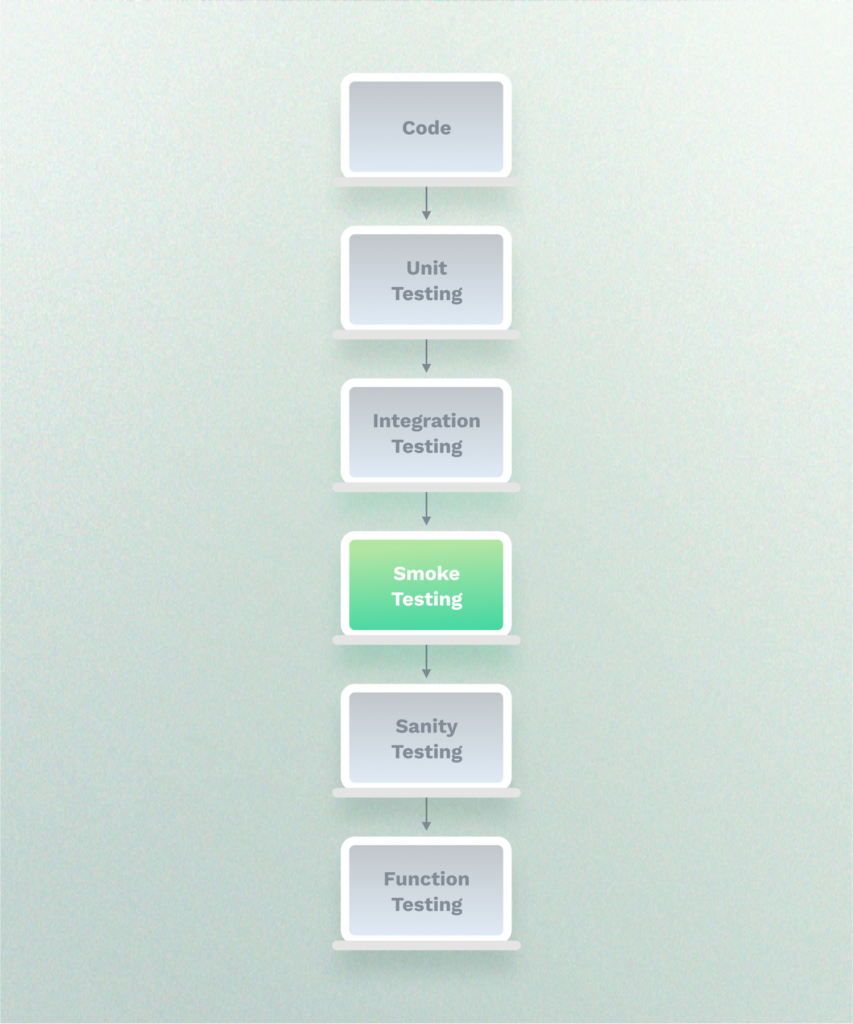
A typical workflow might include the following:
- Run smoke tests after a new build or deployment.
- Run sanity tests after targeted fixes or feature updates.
- Run regression tests before a release or during broader QA cycles.
Together, these testing techniques help QA teams identify issues throughout the development process, from validating new builds and recent fixes to confirming that existing functionality continues to work after changes are introduced.
When should you use smoke testing vs sanity testing?
Choosing between smoke and sanity testing depends on what changed and what you’re trying to validate. Following best practices, many quality assurance teams use both testing techniques, because they answer different questions at different stages of the software testing process.
Use smoke testing when:
- A new build or deployment has been completed
- A CI/CD pipeline finishes running
- A release candidate is ready for QA
- You want to quickly verify key user flows, such as login, search, or checkout
- You need a quick go/no-go decision before investing time in more detailed test cases
Use sanity testing when:
- A bug fix has been deployed
- A small feature or configuration change has been made
- A hotfix has been released
- You need to validate the area affected by a recent change
- You want to confirm that a customer-reported issue has been resolved
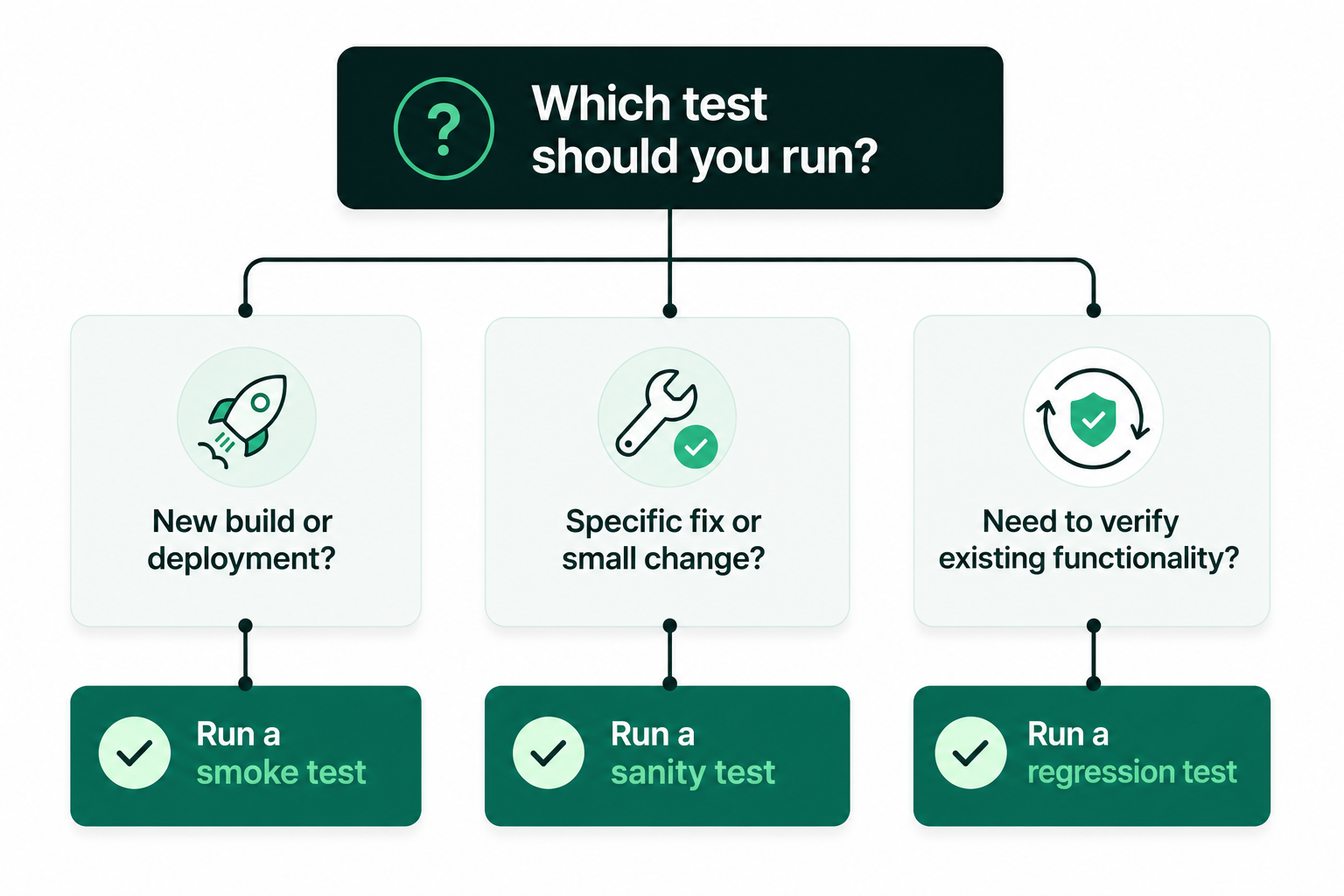
A simple way to decide which testing technique to run is to ask yourself:
- Is this a new build? Run smoke testing.
- Is this a targeted fix or small change? Run sanity testing.
- Do we need to verify that existing functionality still works after the change? Run regression testing.
How to automate smoke and sanity testing
There are many benefits to automating both smoke and sanity testing. Smoke tests are great candidates for test automation, because they follow the same core user flows after every deployment. Sanity tests can also be automated when the same areas are tested repeatedly after bug fixes or feature updates.
Automation helps teams catch issues within minutes of a deployment or code change while minimizing time spent on repetitive manual testing. Instead of rerunning the same test cases, QA teams can focus on more comprehensive testing and other high-value tasks. For teams working with CI/CD workflows, automated tests can be scheduled to run after deployments, with instant alerts set to help teams find issues as soon as they occur.
Automating smoke tests with Ghost Inspector
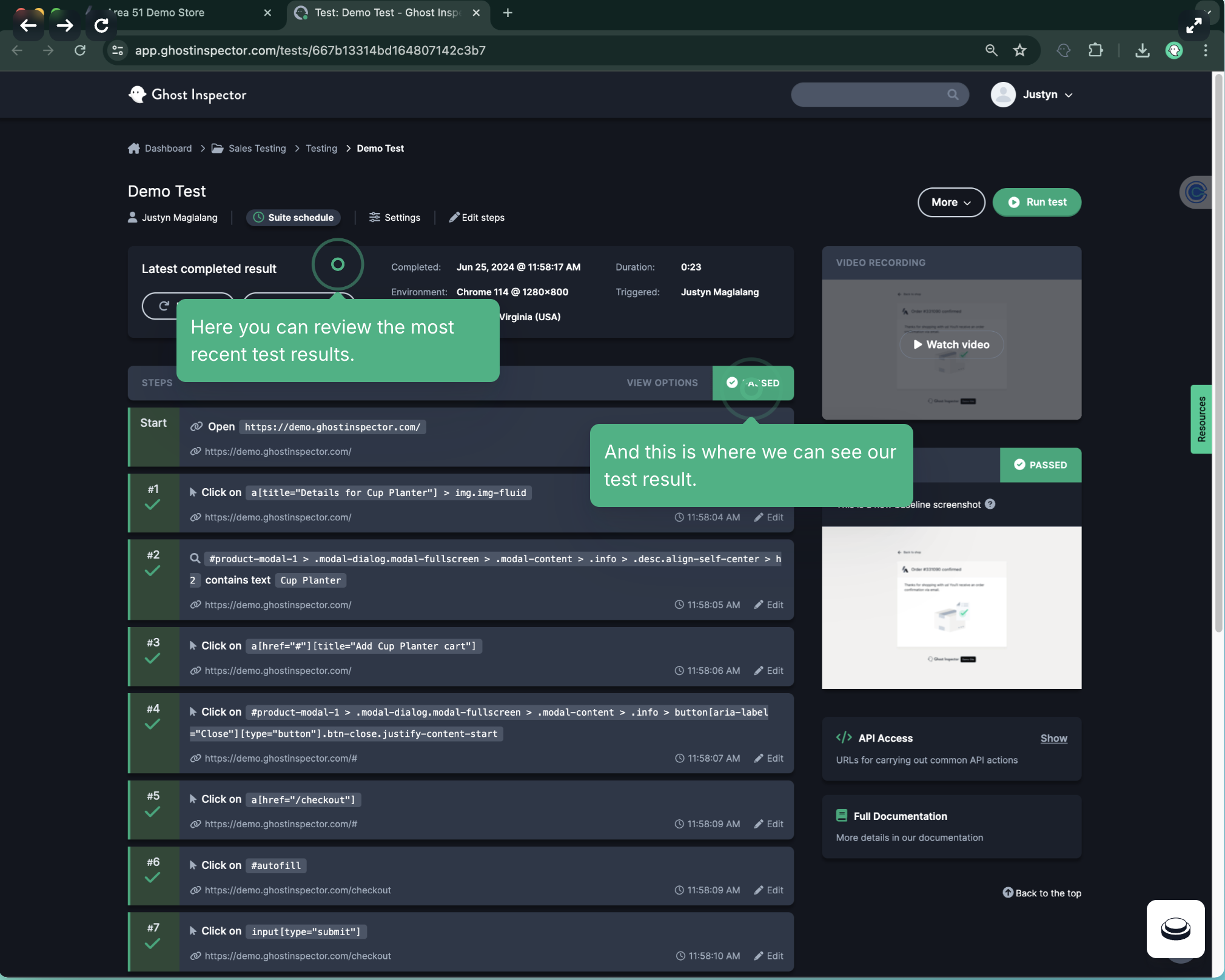
With Ghost Inspector, you can easily automate the software testing process by building and scheduling browser tests that mimic real user interactions on your website or web app. The best part? You don’t need to be a coding expert to get started. With features like a visual test recorder and drag-and-drop test editor, anyone can create and maintain automated tests.
For smoke testing, you can schedule a test suite that checks key user flows to run immediately after each deployment, like:
- Loading the homepage
- Logging into an account
- Opening the dashboard
- Using search
- Loading the shopping cart and checkout
- Accessing key account pages
Ghost Inspector allows you to run tests automatically after a deployment or code change thanks to native integrations with tools like GitHub Actions, Jenkins, and CircleCI.
Ghost Inspector also supports scheduled test runs, captured screenshots, detailed test history, and instant alerts through email, Slack, and other integrations, making it easy to quickly find regressions and troubleshoot failures.
Automating sanity tests with Ghost Inspector
For sanity testing, you can build and automate tests tied to specific components or bug fixes. For example, if a recent patch was made to the checkout process, you could create a Ghost Inspector test by clicking through the checkout process to verify that:
- The checkout flow still works
- The updated field behaves correctly
- The expected success or error message appears
- The user can successfully complete checkout
You can trigger these tests automatically through your CI/CD pipeline or API calls, making it easier to validate fixes without repeating the same manual checks.
Ghost Inspector’s other features include:
- Advanced end-to-end testing capabilities
- Compatibility across various browsers and devices
- Automated visual regression testing through captured screenshots and reports
- Reusable components and test environments to maximize test coverage
- Data-driven testing through CSV uploads or external data sources
- Detailed test result history and versioning to help teams track changes and regressions over time
And more!
If you’re looking for an easy way to implement test automation for smoke testing, sanity testing, and many other stages of the software testing process, Ghost Inspector helps democratize test building so anyone on your team can create and maintain automated browser tests, regardless of coding experience.